Why Is My Stand Mixer Walking Across the Counter?
A stand mixer that creeps or shuffles across the counter is annoying but almost always fixable with a few simple changes.
You turn on the mixer, step away for a minute, and come back to find it has moved several inches toward the edge of the counter. This happens more than you might expect, and it is not a sign that something is broken. The causes almost always come down to surface contact, load imbalance, or how the machine is set up. Understanding each one makes it easy to stop the problem for good.
Products mentioned in this post
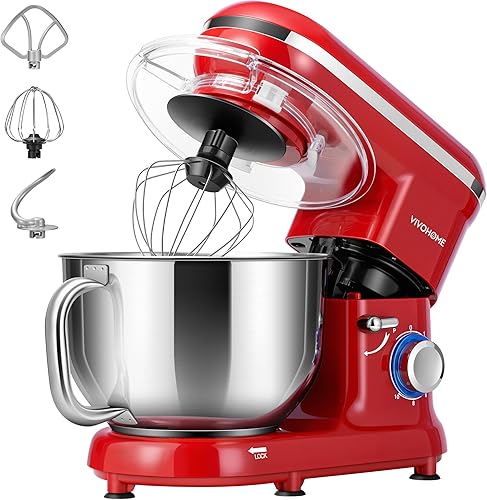
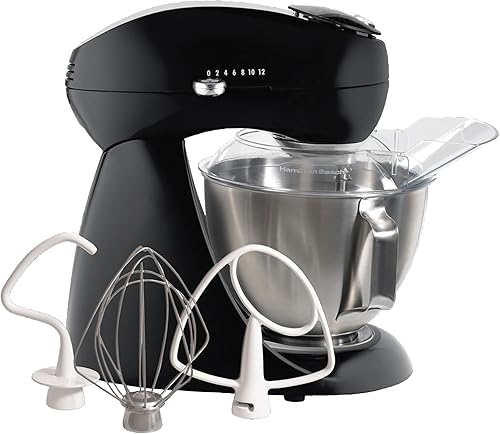

The Counter Surface Is the First Thing to Check
Most stand mixers ship with rubber feet on the bottom, and those feet are designed to grip a smooth, clean countertop. If your counter surface is textured, damp, or has a wax or oil residue on it, the feet lose their grip and the vibration from the motor pushes the machine forward with each rotation. Wipe the counter dry and clean before you start, and make sure the rubber feet themselves are clean. Over time the feet can pick up grease from cooking or develop a hard, shiny coating that does almost nothing for traction. Replacing worn rubber feet costs very little and often solves the problem immediately.
Overloading the Bowl Causes More Vibration
Every stand mixer is rated for a certain bowl capacity, and pushing past that rating forces the motor to work harder, which increases vibration. A 4.5 qt bowl, like the one on the Hamilton Beach 63227, is designed for batches that fill it no more than two thirds of the way. Stiff doughs in particular, such as bread or pizza dough, put much more lateral force on the head than light batters do. If the machine is walking mainly when you make dough, try splitting the batch in half and running two smaller passes. The vibration will drop noticeably and the motor will run quieter too.
Speed Setting Matters More Than People Realize
Starting a mixer at a high speed sends a sharp jolt of torque through the bowl and the head before the ingredients have a chance to come together. That sudden jolt is enough to break the grip of the rubber feet on many counters. Always start at the lowest speed, let the ingredients begin to combine, and then increase the speed gradually. This is true whether you are whipping cream or working thick dough. The steady ramp in power keeps vibration low during the most critical first few seconds when the machine is most likely to shift.
Weight and Design Affect How Much a Mixer Moves
Heavier machines walk less because their mass absorbs vibration rather than converting it into lateral movement. A mixer that weighs around 21 lb, such as the Hamilton Beach 63227, will stay put more reliably than a lighter model in the 5 to 11 lb range under the same load. That does not mean lighter mixers are bad, but they need a better gripping surface or a non-slip mat underneath to compensate. The shape of the base also plays a role. A wide, flat base distributes weight evenly across all four feet, while a narrow base concentrates pressure and makes it easier for the machine to rock.
A Non-Slip Mat Is the Easiest Fix
If your counter is sealed stone, tile, or any surface that stays slick even when clean, a thin non-slip mat placed under the mixer solves most walking problems immediately. Silicone kitchen mats or even a folded silicone trivet work well. The mat stays flat, the rubber feet grip it, and the whole assembly stays in place even under heavy loads. This is a common fix for countertop appliances of all kinds and costs almost nothing. Some users have also had success with a damp kitchen towel under the machine, though a dedicated mat holds up better over repeated use.
Check That the Bowl Is Seated Correctly
A bowl that is not fully locked into position will wobble slightly with each rotation of the attachment. That wobble transfers to the whole machine and can make an otherwise stable mixer creep forward. Before you start mixing, push the bowl down firmly and twist it until you feel and hear it click into place. The same applies to the attachment itself. A dough hook or flat beater that is not fully seated on the shaft will produce uneven resistance that sends extra vibration through the head. Take an extra few seconds to confirm both are locked before turning the machine on.
When the Machine Still Walks After All of That
If you have cleaned the counter, checked the bowl, started at low speed, and added a non-slip mat and the mixer still walks, the issue may be internal. A worn drive belt or loose internal component can cause irregular vibration patterns that no external fix will fully address. At that point it is worth contacting the manufacturer, especially if the machine is under warranty. Some brands will repair or replace units with known vibration issues at no cost. Keeping the original box and purchase receipt makes this process much faster.
Frequently asked questions
Is it normal for a stand mixer to move a little while running?
A small amount of movement on very high speeds is common, especially with stiff doughs. The machine should not travel more than an inch or two during a normal batch, and it should not move at all on low to medium speeds. If it does, check the feet and the counter surface first.
Will a heavier stand mixer walk less than a lighter one?
Generally yes. A heavier machine has more mass to dampen vibration, so less of that energy converts into forward movement. That said, even a 30 lb machine will walk on a greasy or slick surface, so surface condition still matters regardless of how much the mixer weighs.
Can the speed knob position cause walking?
Yes. Jumping straight to a high speed setting sends a strong jolt of torque through the machine before the load is evenly distributed. Starting at the lowest speed and increasing gradually keeps vibration much lower during the critical first few seconds when walking is most likely to start.
Does the type of attachment affect walking?
It can. A dough hook puts more lateral force on the head than a whisk or flat beater because it pushes against thick dough rather than moving through a loose mixture. If your machine only walks when using the dough hook, that is a sign to either reduce your batch size or add a non-slip mat to compensate.
My rubber feet look fine but the mixer still walks. What else can I try?
Check that the bowl is fully locked into its mount and that the attachment is seated all the way on the shaft. A loose bowl or attachment adds wobble that bypasses the feet entirely. If both are secure and the machine still walks, place a silicone mat underneath and see if that resolves it before looking at anything else.